Fleet · multi-location
Know where every car is
Run two yards or one-way hires and your cars drift. A Jimny goes out from Christchurch and gets dropped in Queenstown, and now the whiteboard is lying to you. Glovebox tracks each car's home base and works out where it actually is, so the calendar, and the booking engine, keep up with the fleet instead of the other way round.
The view
The calendar shows where each car actually is
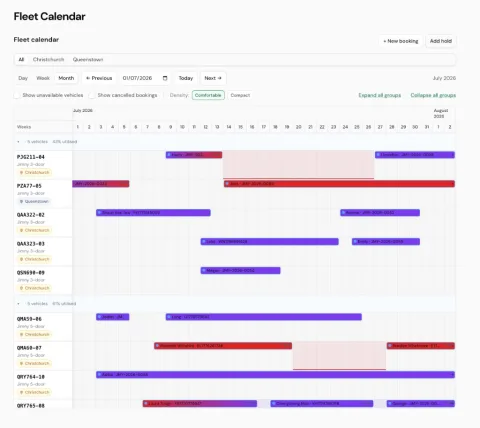
Every vehicle row carries its home base. When a car is sitting idle somewhere that isn't home, the fleet calendar tints that stretch in the other location's colour, a quiet flag that the car is parked away and probably needs relocating back. No extra screen to check; it is right there on the timeline you already use.
How it works
Four things working quietly in the background
A worked example
One Jimny, two towns
Say a Christchurch Jimny goes out on a one-way hire and gets dropped in Queenstown. The hire bar ends, and the rest of that row shades over. The car is now idle, three hundred-odd kilometres from where it belongs.
From that moment, a customer searching Queenstown pickups will see it; a customer searching Christchurch will not. Book a transfer or another one-way hire to bring it home, and it is back on the Christchurch list, worked out for the pickup time you are quoting, not just where the car happens to sit right now.
Who it is for
Built for operators whose cars do not stay put
If you run more than one yard, do one-way hires between towns, or move cars around on relocations and Freelegs transfers, the hardest question is usually the simplest one: where is that car right now, and can I rent it from here? Glovebox answers it on the same calendar your front desk already lives in: no separate tracking sheet, no end-of-day reconcile of where everything ended up.
Next step
See your real fleet on the calendar
Free to build. Pay when you go live. Load your locations and a few cars and watch the calendar keep track of them for you.